Court Records give Wichita residents immediate insight into case filings, from civil complaints to criminal judgments, through the Sedgwick County court record database accessible at the county clerk’s office. By entering a party name, case number, or filing date, users can retrieve public court documents, motions, and hearing notices, while also learning how to request certified copies or understand sealed file restrictions. This streamlined search meets the need for fast, reliable information without unnecessary jargon.
Court Records empower individuals to verify case status, view disposition details, and examine settlement outcomes using the Sedgwick County court case search portal. Whether tracking a family law proceeding, probate matter, or juvenile case, the online lookup tool matches docket numbers to the correct jurisdiction and highlights any system delays for recent filings. Knowing the exact steps to obtain official copies saves time and reduces frustration.
How to Search Court Records
Sedgwick County court records are case filings and docket entries held by the Kansas Judicial District 18 court system. The official search helps people locate a civil, criminal, family, probate, or juvenile matter by case number, party name, or filing date when the matter is open to public viewing. Residents can also inspect civil court records for detailed public documentation. Its main purpose is to identify the correct case, review listed events, and find the next step for viewing documents or requesting an official copy. A search result is a case index, not proof that every document can be viewed or copied online.
Official Search Portal: https://www.dc18.org/records
Steps to Search
- Open the official records portal and choose the district court record search.
- Select a case number search when the docket number is known; use a party name search when it is not.
- Enter the name, number, or filing date range, then add a court or case-type filter if the search screen provides one.
- Open each matching result and compare the full case number, case caption, court, filing date, and status before selecting a matter.
- Review the listed filings, open any document made available by the portal, and contact the court clerk for a file copy or certified copy that the portal does not supply.
Sedgwick County Case Filings and Proceedings
The court clerk’s office maintains the official case files for Judicial District 18. Each case has a case number and a caption, which names the parties involved. The docket is a chronological list of filings and court events linked to that case. Its status label gives a quick administrative summary, such as an open or closed case, but a full case review may require the filed documents.
Complaints, Petitions, Answers, and Responses
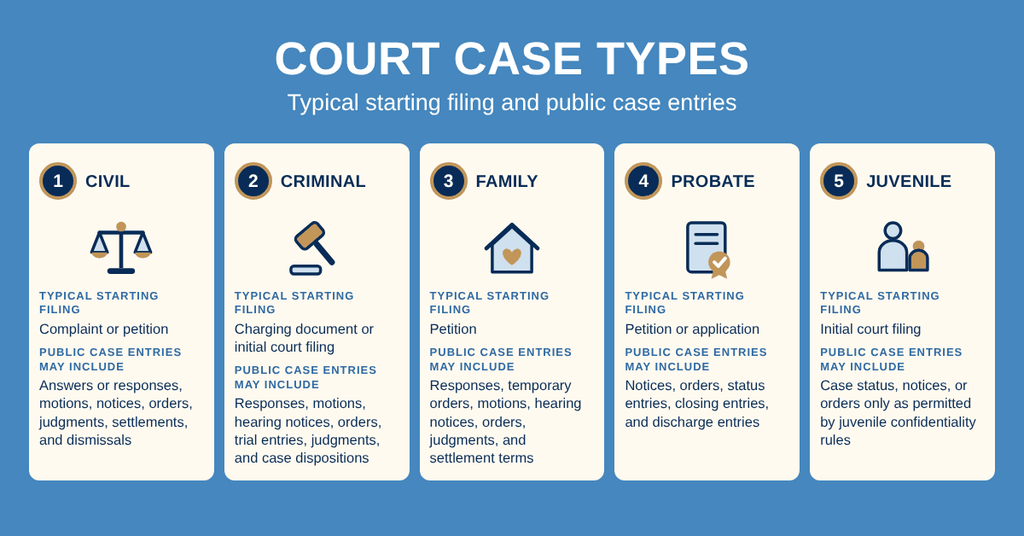
A complaint usually begins a civil or criminal case, while a petition often starts a family, probate, or juvenile matter. The exact title depends on the type of case and the court’s rules. An answer or response may answer the claims, admit or deny parts of them, or state the party’s position. The docket normally shows when these papers were filed, their document titles, and the case events that followed.
A document title in the index does not guarantee that its full image is posted online. Some entries may lead to a document image, while others may list only the filing date, event, or court action. Reviewing the surrounding docket entries can show how a filing was handled without replacing the actual document.
Motions, Notices, Orders, and Filed Exhibits
A motion asks the court to take a stated action. A notice tells a party about a hearing, deadline, or other court event. An order records a judge’s decision on a request. Each has a different role, so similar wording in a docket entry should be read according to its document title and the event beside it.
Filed exhibits are items offered to support a claim, defense, or other position. They may include documents, photographs, or other items listed with a hearing or trial entry. The public docket may show that an exhibit was filed without displaying its contents. A clerk-supplied file copy may be needed to review such an item in full.
Presiding Judge, Courtroom, and Jurisdiction
The presiding judge is the judge assigned to handle the case. Judge assignments can change, so the newest docket entry or clerk confirmation should be used for a current matter. A courtroom number identifies where a hearing may be called, but that location can change because of calendar needs or court orders. A hearing notice or current court calendar is more reliable than an old search result.
Jurisdiction refers to a court’s legal authority to hear a particular case. The subject of the case and the location of the parties or events can place a matter in a different court than the one first searched. A municipal court matter, a district court matter, and an appeal before the Kansas Court of Appeals or Kansas Supreme Court each use a separate record system.
Treating the Full Case Number as One Identifier
Treat the complete case number as one identifier. Letters, prefixes, leading zeros, and any suffix may be part of the correct number. Copy the number from a filing receipt, summons, pleading, hearing notice, or earlier search result instead of typing it from memory. If a copied number produces no match, try it without spaces while keeping every letter and zero in place.
Hearings, Judgments, Settlements, and Dismissals
A docket can show several different hearing events. “Scheduled” means a hearing was set, “continued” means it moved to another date, and “heard” means the proceeding took place. Each phrase should be read with its date. A continued hearing does not mean the case ended, and an old hearing entry may not reflect the next scheduled date.
A judgment states the court’s decision on a claim, charge, or requested relief. A settlement is an agreement that may end the dispute without a trial. Settlement terms do not necessarily become part of the public court file unless a related document was filed. The docket may show a notice, order, stipulation, or dismissal connected with the settlement.
A dismissal is a docket event that ends the active case or a part of it. The entry may identify who requested the dismissal or whether a court ordered it. Trial records may also include hearing transcripts, exhibits, and other filed material. These items can span many pages, so review the case history before requesting a complete copy.
Public Availability, Restrictions, and Official Copies
Kansas law treats many judicial records as open to public inspection, with exceptions for juvenile matters, expunged records, sealed files, and other protected categories. The Kansas Open Courts Act in K.S.A. 22-3301 and related sections is a central source for those rules. Public availability has several levels: a case may appear in the index, a document may be posted online, or the file may require a request to the court clerk.
Public Case Directories and Search Logs
The public case directory works much like a card catalog. A party-name search may return several cards for the same person because that person can appear in several cases. Open each result and compare its caption, case number, court, filing date, and current status. A case number search usually creates the clearest match because it points to one court matter.
For repeated searches, keep a simple search log with the date, search term, court filter, and case number found. This record helps distinguish a missing portal entry from a wrong query. A printed or saved search result only shows what the portal returned. It is not a certified copy and may not contain the filed documents.
Sealed, Expunged, and Juvenile File Rules
A sealed file remains part of the court system, but a court order limits ordinary public viewing. The public index may show a case or docket event without showing the protected document. The clerk cannot release the file solely because a requester asks for it. The requester must have a legal basis for access, such as party status, a court order, or another authorization recognized by law.
An expunged record is treated as unavailable under a court order entered through the statutory expungement process. A request to expunge a case is different from a request for a copy of a regular public file. Eligibility, waiting periods, and required filings can change with amendments to Kansas law. The court clerk can check the current statute and the case history without predicting an outcome.
Juvenile records follow separate confidentiality rules under Kansas and federal law. Public viewing is often limited to the parties, attorneys, approved agencies, and other people allowed by law. A party who needs a juvenile file should follow the clerk’s process for that restricted category rather than treating a juvenile matter like a civil or criminal case.
Court Clerk and Certified Copy Requests
A certified copy is issued and authenticated by the court clerk after the requested material is checked against the official file. To request one, provide the full case number, document title, entry or filing date, request for certification, preferred delivery method, and any deadline that applies to the requester’s matter. A description such as “the latest order” may create confusion when several similar orders were entered.
Certification confirms that the copy corresponds to the court file. It does not prove that every statement within a document is true, and it does not replace legal advice about the document’s meaning. A document downloaded from an e-filing screen or printed from the portal should not be treated as certified unless the clerk confirms that status.
The court clerk can explain what the official file contains and how a request must be handled. You can also access family court information to review official records. The clerk does not advise a party on legal rights, filing strategy, or the merits of a dispute. Those questions belong with a qualified legal professional.
Copy Fees and Processing Timelines
Use the court clerk’s current fee schedule for exact charges. Possible charges depend on the request and may include a per-page copy amount, a base document charge, certification, electronic delivery, postage, or rush handling. Fee amounts and accepted payment methods can change, so a requester should ask for the current total and payment instructions before sending payment.
Processing time depends on the size of the file, the condition of the paper record, scanning work, payment handling, staff workload, and the delivery method. A recent single document may require less work than a multi-year file with hundreds of pages. Ask the clerk for a time estimate tied to the actual request rather than relying on a general promise.
Portal updates and copy preparation are separate processes. A case may appear in the search portal before every document has been scanned, or a document may appear online before a certified paper copy is ready. The time shown for an indexed filing does not promise a certified-copy turnaround date.
Fixing Court Record Search Problems
Most failed searches involve a small mismatch in the search terms, case number, court, or filing date. A missing result does not prove that no case was filed. Use a controlled process so each change is tested and the clerk receives useful details if direct help becomes necessary.
- Confirm that the matter belongs to Sedgwick County District 18 rather than a municipal court, another Kansas district, or an appellate court.
- Use the complete case number, including letters, leading zeros, and suffixes.
- Try the exact party name shown on a filing, then test a broader spelling or a business name without punctuation.
- Widen the filing date range when the remembered date falls outside the selected period.
- Compare every matching result by case number, caption, court, filing date, and status.
- Check whether the filing was made recently enough that intake or index posting may still be pending.
- Ask the clerk to trace the matter when a plausible case number produces no result.
Matching Party Names and Docket Numbers
Name searches depend on the text stored in the court index. A person may appear under a full legal name, a middle initial, a previous surname, or the name of a business. Punctuation and business suffixes can affect the match. Search the most exact version first, then remove likely nonessential terms one at a time.
A complete case number gives the cleanest check because it belongs to one case within the court system. If several name results remain, do not select one based on the surname alone. Match the caption, court assignment, date, and case type. A same-name match can still belong to a different case involving a relative, business, or former spouse.
System Delays for Recently Filed Cases
A newly filed case may reach the clerk before its entries appear in the public index. Paper filings can also need receipt, scanning, and cataloging before they become searchable. No fixed posting interval should be assumed for every case or filing method. If a recent case is missing, first allow the normal intake process to catch up, then ask the clerk whether the filing has been indexed.
Older cases can face a different issue. A paper file may sit in an archive, use a legacy numbering format, or require staff to retrieve it outside the online system. A failed digital search does not cover archived records automatically. The clerk can check whether the case is stored in another system or needs a physical file search.
Unlisted, Archived, or Missing Documents
No search result can mean several things. The case may use a different name, the case number may contain an error, the matter may belong to another court, or the filing may still be moving through intake. A document can also be missing from the viewer even though it exists in the official file. Sealed and expunged categories create another valid reason for limited public results.
Before requesting staff help, run one exact case-number search, test one broader name search, and widen the date range once. Those checks prevent avoidable repeat work and give the clerk a clearer record of what was tried. Keep the failed query, date, and result count with the request details.
Correcting an Inaccurate Docket Entry
An online entry can contain a spelling error, an outdated party name, or a status that no longer matches the file. The clerk can compare the index with the source filing and explain the correction process permitted by court records rules. A clerical error in a name or date may be handled differently from a dispute over the substance of a court order.
Do not assume that a search result proves the filing was accepted, served on another party, or entered by the stated deadline. Those points may require a file-stamped document, a receipt, or legal review. Use a certified copy or the filed source document when exact content matters.
Tracing a File Through the Court Clerk
A productive clerk request contains the full case number, exact case caption, court or division, approximate filing date, and title of the requested document. Ask the clerk to check the public index, filing receipt, scanned document, paper file, archive, and any restriction that could apply. This list covers the main places a record can be at each stage.
Describe the problem as a request to trace or retrieve a record rather than an assumption that no filing exists. The clerk can then check the right sources and report whether the document is pending intake, stored outside the online index, subject to a restriction, or ready for a copy request.
Court Records Compared with Related Sources
Several public sources contain part of a court matter, but each answers a different question. Choosing the right source prevents a searcher from treating a hearing schedule as a case disposition or an arrest record as proof of a conviction.
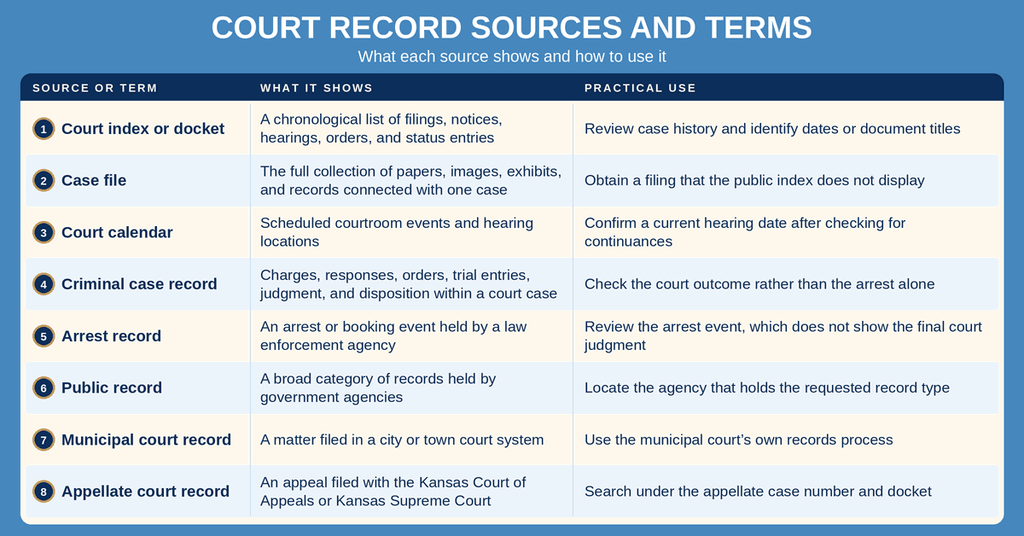
Choose the source based on the question before requesting documents. A docket answers what was filed, a case file supplies the filed papers, a calendar addresses hearing logistics, and an arrest record concerns an agency-held event. These records can relate to one event without saying the same thing.
Verify Time-Sensitive Court Events
A search result is useful for case research, yet it should not replace time-sensitive confirmation from a hearing notice, court order, or clerk. Docket posting can lag behind a hearing, continuance, filing, or judgment. A current verification reduces the risk of relying on an outdated date.
Confirming a Hearing Date and Location
Check the docket for the newest hearing entry and look for wording that shows a continuance or reset. Confirm the date and courtroom with the clerk when the matter is close, the old entry conflicts with another source, or travel is planned. A calendar listing confirms a scheduled event but may not explain the case details behind it.
Deadlines, Service, and Legal Decisions
A public index does not prove that a deadline was met, a document was served on every party, or a settlement became a binding court order. Those points can depend on court rules, filing receipts, and the terms in signed documents. Consult a Kansas-licensed attorney for legal interpretation, and use the clerk for record retrieval and procedural details.
Confirming Exact Document Content
Read the complete document rather than relying on its title or a short docket description. For a filing that will be used in another legal or business process, ask whether the recipient needs a certified copy, an ordinary copy, or a document with a filing stamp. Only the court clerk can confirm the status of a clerk-certified copy.
Contact Information
The Sedgwick County Courthouse is the listed location for direct court-record requests handled by the clerk’s office. Use the official search portal for case lookup and the details below when a document, copy request, restriction, or search issue needs direct review.
Frequently Asked Questions
Find quick answers about accessing Sedgwick County court records, what you need to know, and how to obtain official copies.
How can I search Sedgwick County court records online?
Visit the official district website at dc18.org/records. The portal lets you look up civil, criminal, family, probate, and juvenile cases by case number, party name, or filing date. Choose the appropriate court type, enter the search criteria, and click Search. Results show docket entries, filing dates, and case status when the record is public. If a case is sealed or restricted, the system will indicate that the information is not available online.
What information is needed for a court record lookup?
At minimum, you need one of the following: the case number, the full name of a party involved, or the exact filing date. Providing the court type such as civil, criminal, or family helps narrow results. If you have multiple parties with similar names, adding the filing year improves accuracy. For older cases, knowing the docket number or the judge’s name can also assist the search. The online portal accepts these details and returns matching records if they are public.
Can I request certified copies of court documents?
Yes. After locating the case online, you can request a certified copy through the clerk’s office at the Sedgwick County Courthouse. Bring a valid ID and the case number. Fees apply per page, and payment is accepted by cash, check, or credit card. The clerk will verify the request, process the copy, and provide a receipt. Certified copies are often required for legal filings, appeals, or personal records.
How long does it take to receive a court record request?
Processing time varies by request type. Simple document copies usually take one to three business days after the clerk receives payment and identification. More complex requests, such as large file bundles or records from older archives, may require five to ten business days. Requests submitted during peak periods or holidays can extend the timeline. The clerk’s office will give an estimated completion date when you submit the request.
Where do I find case status for a Sedgwick County filing?
Log in to the district’s online portal and enter the case number or party name. The case summary page displays the current status, such as “Pending,” “Closed,” or “Dismissed.” It also lists upcoming hearing dates, recent docket entries, and any final judgments. If the case is sealed, the portal will note that the status is not publicly viewable. For the most up‑to‑date information, you can call the clerk’s office at (316) 660‑5900 during business hours.